
Comparisons
Cancel a ManyChat subscription in three clear steps
The Ootto Team · 1 min read · August 19, 2026
How to use this
1Connect Claude to Instagram
Connect Claude to your Instagram account
One click opens Claude with the connector already filled in - sign in, authorize, and it's live. No key to copy, no setup outside your browser.
https://mcp.ootto.ai/mcpConnect2Add the skills
Once Claude can reach your account, give it the methods to work with. Clone the free repository and Claude discovers the skills automatically.
git clone --depth 1 https://github.com/Ootto-AI/claude-content-skills.git && bash claude-content-skills/install.shBrowse all 30 skills on GitHubInstructions: how to connect your Instagram account to Claude
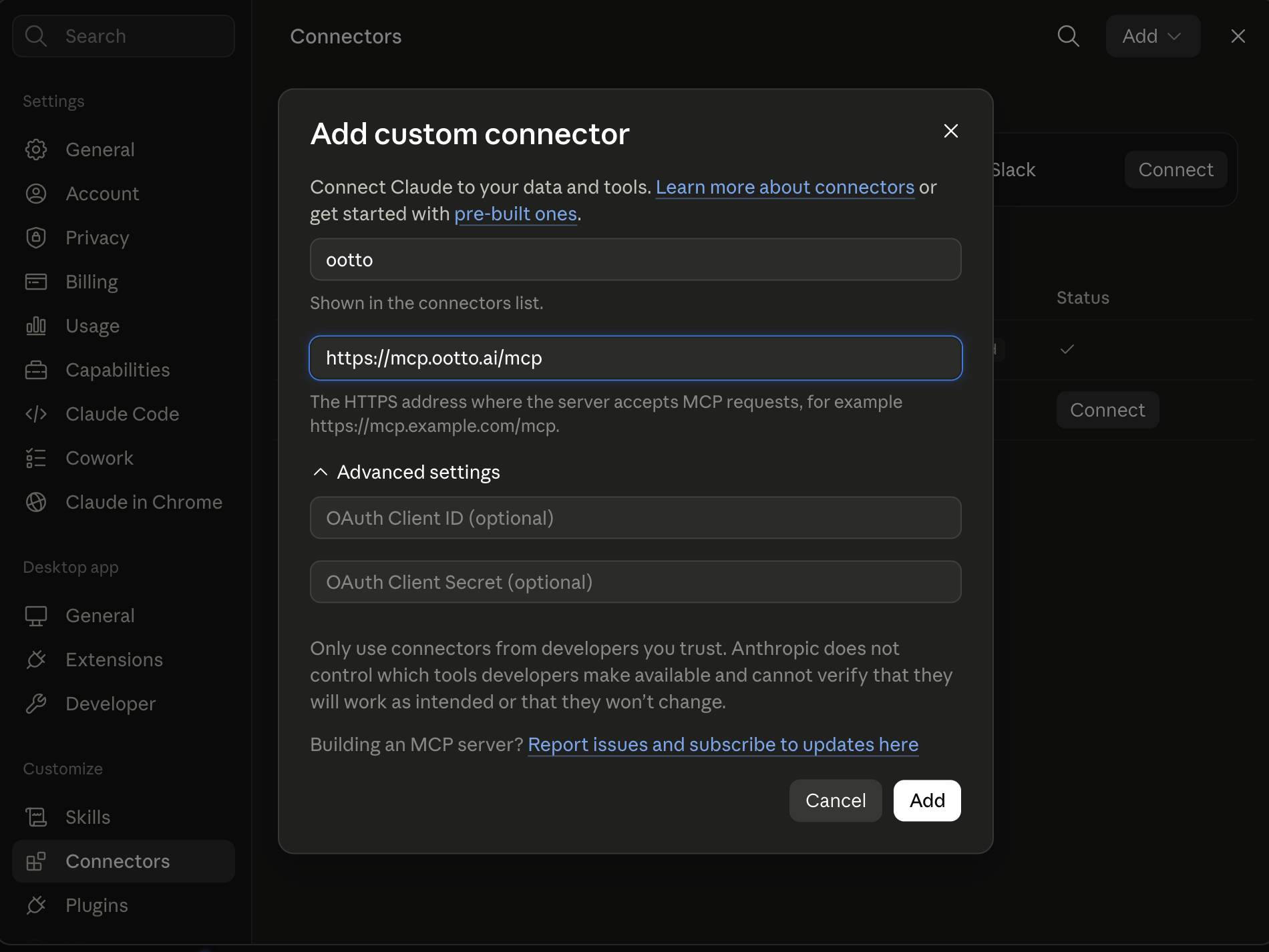
Connect above does this for you. If Claude ever opens the dialog empty, here's exactly what goes where:
Ootto
Your 24/7 Instagram Growth Operator
Skip the manual setup
- Posts finished Reels straight to your Instagram
- Real motion-graphic Reels, not slideshows
- Built around your own photos and footage
- Finds winning content opportunities in your niche
- Writes on-brand scripts and captions
- Answers every comment by your own keyword rules
- DMs qualified leads and starts the conversation
- Runs up to 50 Instagram accounts
One AI. Every Post. Every Comment. More Leads. More Sales.
As of 2026-08-19, the official cancellation flow is: open workspace settings on desktop, go to Settings → Billing, and cancel there.
If your plan was purchased on iOS or Android, cancel in the store first, not in web Billing.
The exact path on web (desktop)
- Open your workspace on desktop and go to Settings → Billing.
- Click Cancel Subscription.
- Select a reason, add any context, and click Cancel My Subscription.
What this means after click
- The status moves to Pending cancellation.
- Access remains until your current billing period ends.
- Future renewals stop after that period.
- If the next invoice was already generated, one final charge attempt may still happen.
ManyChat docs describe this explicitly, which is why status checks matter before support requests.
Migration-safe stop checklist
Before you move tools, do this once:
- Export active automations and campaign definitions.
- Export contact lists or keep a schema snapshot.
- Record connected channels and trigger settings.
- Remove obsolete team members.
- Export billing notes and support threads.
Why this exact order
Deletion and ownership changes are destructive. Keep exports before you switch stacks.
Verified source and date
- ManyChat Help Center - “How to cancel your ManyChat subscription” (Updated Dec 03, 2025): https://help.manychat.com/hc/en-us/articles/14281418466972-How-to-cancel-your-Manychat-subscription
- ManyChat Help Center - “Mobile Subscriptions” (Updated Jun 01, 2026): https://help.manychat.com/hc/en-us/articles/26788419978780-Mobile-Subscriptions
Read next
Ootto
Run Ootto in your Claude
Skip the manual setup
- Finds winning content opportunities
- Creates on-brand Reels and captions
- Replies to comments instantly
- Starts personalized DM conversations
- Qualifies leads automatically
- Helps book calls and drive sales
- Learns and improves with every interaction
One AI. Every Post. Every Comment. More Leads. More Sales.
Get started$1 today, non-refundable. Starts your 7-day trial, then $48/mo. Cancel anytime.
Get started