
Content
The Only Way to Grow Your Instagram With Claude in 2026
The Ootto Team · 6 min read · June 20, 2026
How to use this
1Connect Claude to Instagram
Connect Claude to your Instagram account
One click opens Claude with the connector already filled in - sign in, authorize, and it's live. No key to copy, no setup outside your browser.
https://mcp.ootto.ai/mcpConnect2Add the skills
Once Claude can reach your account, give it the methods to work with. Clone the free repository and Claude discovers the skills automatically.
git clone --depth 1 https://github.com/Ootto-AI/claude-content-skills.git && bash claude-content-skills/install.shBrowse all 30 skills on GitHubInstructions: how to connect your Instagram account to Claude
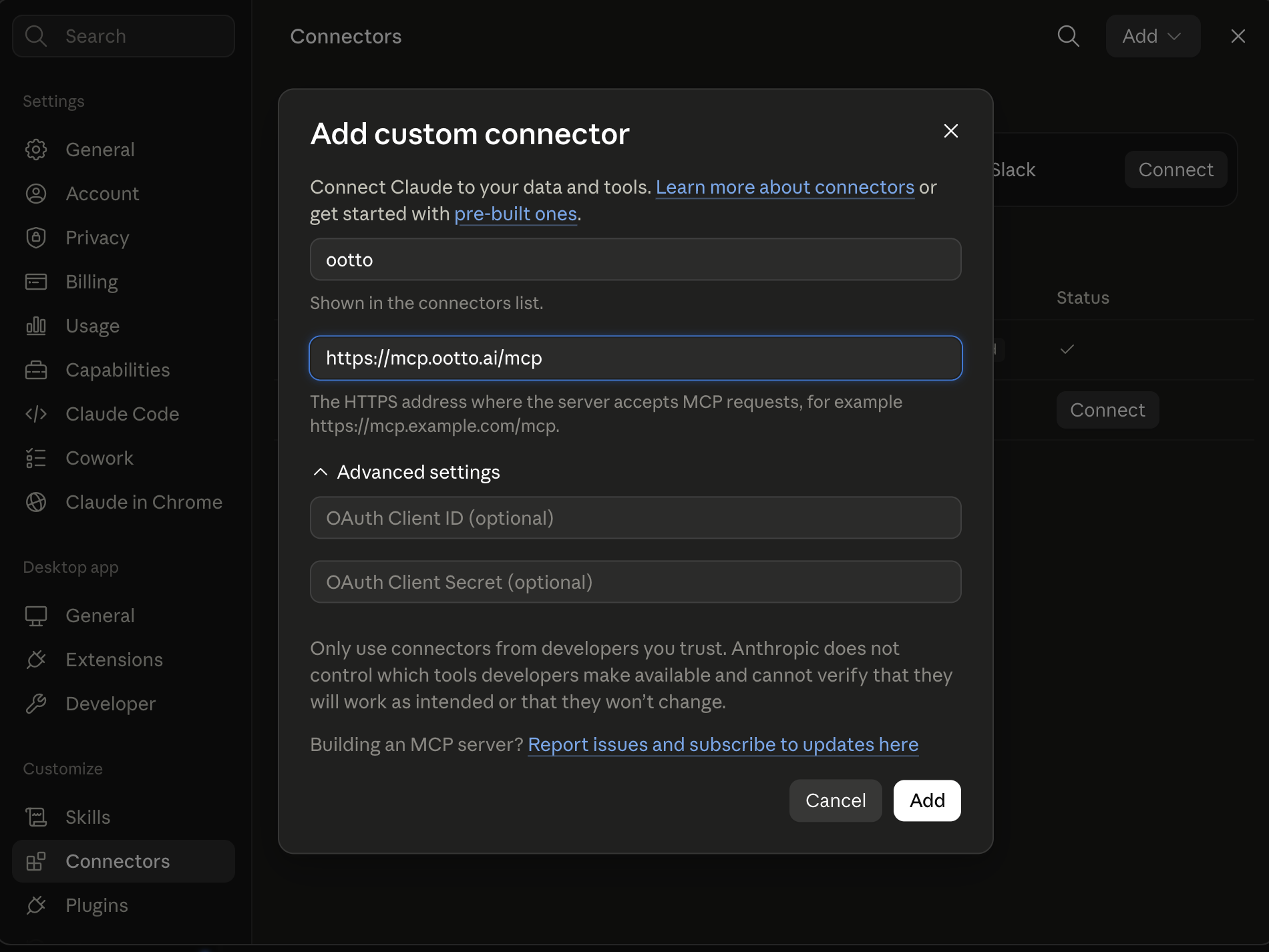
Connect above does this for you. If Claude ever opens the dialog empty, here's exactly what goes where:
Turn every comment into an inbound lead.
On Claude Pro or Max, switch to Opus before you build - it makes a visibly better reel.
We grew our own business on Instagram to over 10,000 leads in a month - one reel alone pulled 5,261 comments - spending 15 minutes a day. No agency, no content team, no posting schedule we couldn't keep.
For the less polished version, including what we failed to measure, read what happened when I let the system run my Instagram for a month.
Here's exactly how we did it - the whole method, nothing held back.
The mega prompt from the reel
This is the exact prompt from the reel. It learns your brand, finds what already works in your niche, makes the reel and writes the caption. It does not post anything without you.
MEGA PROMPT - MAKE MY REELS Use Ootto, the connector I just added, for everything below. Do not guess anything it can look up. If a step fails, tell me what failed and stop. 1. Check the connection. Confirm you are connected to Ootto and name the Instagram account you can see. If you cannot, stop and tell me what to fix. 2. Learn my brand. Onboard my brand from my connected Instagram and my website. Ask me for the website if you do not have it. Then tell me, in three short lines, who I help, what I sell and how I sound. Wait for my yes or my corrections before you go on. 3. Find what already works. Look at my own posted reels and find the ones that beat my usual views. Then research my niche and find the reels and ideas that are proven to work there. Use the ideas already waiting in my Ootto app first. Show me five ideas, each with its topic and why it should work for my audience. I will pick one, or pick the strongest yourself if I say go. 4. Write the hook. The hook is the first line and the first thing on screen. It must promise exactly what the video shows and the result the viewer gets, in plain words. Weak: "You need to see this". Strong: "Watch me turn one idea into a finished reel, and you can post it today". Give me three hook options and pick the best one. Then build the reel in this order: the hook, then the value (the steps, the proof or the answer), then a tease of the reward at the end ("stay for the last step"), and the call to action last. Use the call to action from my brand, or ask me for one. 5. Make the reel. Make it with Ootto in my brand: the script, the motion graphics, the voiceover and the music. Wait until it is finished. 6. Check it. Look at the finished reel frame by frame and check four things: the first second matches the promise in the hook, every spoken line is clear, no text is cut off or hard to read, and the call to action comes last. If anything is wrong, fix it and make the reel once more, then tell me what you changed. 7. Give me the caption. Write a caption ready to post: the hook promise as the first line, a short body with the value, a few relevant hashtags, and the call to action last. Do not post anything. Show me the reel and the caption and wait for my approval. Finish by telling me the next reel you would make.
Connect Ootto to Claude first (the steps are above), then paste this into a new chat. On Claude Pro or Max, switch to Opus before you paste it.
How to set this up yourself
Start with the data. Here's the first piece of the stack, run by hand - nothing hidden.
Or stop the manual setup
This is the real product, not a mockup - it is running on our own @jayantcreates.ai account, the same one that pulled the comments above. Stop the manual setup - let Ootto handle it: onboarding, research, and one-click creation. One connector, fifteen minutes a day.
Ootto
Your 24/7 Instagram Growth Operator
Skip the manual setup
- Posts finished Reels straight to your Instagram
- Real motion-graphic Reels, not slideshows
- Built around your own photos and footage
- Finds winning content opportunities in your niche
- Writes on-brand scripts and captions
- Answers every comment by your own keyword rules
- DMs qualified leads and starts the conversation
- Runs up to 50 Instagram accounts
One AI. Every Post. Every Comment. More Leads. More Sales.
Or keep going by hand - the rest of the stack
If you would rather run it yourself, here is the rest of the stack.
2 · Wire it together
Lets an agent make authenticated tool-calls across 1,000+ apps, auth handled for you.
- Sign up at composio.dev and grab an API key from the dashboard
- This one's a Claude Code (terminal) connector - Composio hasn't published a Claude.ai web click-path for it
- Run: claude mcp add --transport http composio-composio "<your Composio MCP URL>" --headers "X-API-Key:<your key>"
- Restart Claude Code (exit, then claude) and confirm with claude mcp list
- First Composio tool call opens a browser link to authorize the Instagram toolkit - Claude then reads comments and posts without you touching tokens
3 · Retention patterns
A Claude skill that lets Claude actually watch a video - frames and transcript aligned on one timeline. This is what finds where people keep watching, and where they leave.
- Claude Code: git clone https://github.com/Ootto-AI/ootto-watch ~/.claude/skills/watch-video
- claude.ai web: zip the folder, add it under Settings -> Capabilities -> Skills
- Then just tell Claude: "watch this video: <url>"
- Downloads via yt-dlp (Instagram, YouTube, X, Vimeo, 1000+ sites), samples key frames with ffmpeg, transcribes with native captions or local faster-whisper
- Pass several URLs at once to compare across them and find the patterns the winners share
4 · Memory
A free, private notes app - your files stay on your machine as plain Markdown.
- Download it (free), create a vault - it's just a folder on your disk
- In Obsidian: Settings -> Community plugins -> Browse -> search "MCP Connector" -> Install -> Enable
- In the plugin's own settings, "Quick setup for clients" -> Download .mcpb and drag it onto Claude Desktop to auto-install (or "Copy config for Claude Desktop" and paste it into Claude Desktop's Settings -> Developer -> Edit Config, then restart)
- Point the skills at that vault so every script is written from your own proven patterns, not a blank page
5 · Render
Render the reel from the script your skills produced (a Node package).
- Scaffold a project: npx create-video@latest --yes --blank my-video, then cd my-video && npm i
- There's no Claude connector that renders for you - Remotion ships Agent Skills instead: npx skills add remotion-dev/skills drops best-practice rules into .claude/skills so Claude writes correct Remotion code
- Drop the script into a composition and render it yourself with npx remotion render <CompositionName> - that mp4 is what you post
6 · Eyes on the internet
Reads and searches Twitter, Reddit, YouTube, and GitHub through one CLI.
- Finds what your niche is actually engaging with, before Claude studies a single reel
7 · The skills - free repo
The Agent Reach and Reel Analyzer logic that turns the data Apify pulls into research you can act on, given away.
- Install as a Claude Code plugin: /plugin marketplace add Ootto-AI/claude-content-skills
- /plugin install claude-content-skills@ootto-content-skills (or clone the repo and run install.sh - both drop the skills into ~/.claude/skills/)
- Run them in order: AI Brain, Agent Reach, Reel Analyzer, Going Viral, Viral Hook Writer, Reel Scripter, Reel Builder, Caption & Hashtags, Comment Responder - or run Content Factory once to chain the whole pipeline for you
It works. We ran it this way first. It also took us weeks, and it broke constantly. If you want the broader version of automating your content, we covered that too.
What it learns about you
This is the Brand Brain - how Ootto learns your voice, your niche, your audience and your rules, so every reel sounds like you and not like an AI.
It's built from your website, your connected Instagram, and research on your niche: your tone, your content pillars, the hooks that already work for your audience, and hard rules for what you'll never say. You can correct any of it by hand. That's what keeps a reel from reading as generic AI content - it's why the method above works the same whether you run it yourself or let Ootto run it. The method doesn't change. Only who's doing the work does.
Want to see the evidence frame by frame? Read the teardown of what a reel that turns into a customer actually looks like, including the reel that missed and the limits of what our numbers can prove.
Running more than one account
Ootto isn't locked to one Instagram. From Accounts in the sidebar, press Add account and onboard a second, third, or fiftieth client exactly like you onboarded the first - one box for their website, Instagram handle, or niche, an optional Instagram connect, and Ootto builds them their own Brand Brain and their own research board, kept completely separate from every other client you run.
Switch which one the app is working on from the Active brand picker at the top of every page, or press Make active on any card back in Accounts - either way, the dashboard, research, and reels all follow whichever brand is active.
One thing stays the same across every brand you add: your plan, your credit balance, and your connector key. Connect Ootto to Claude once and it reaches every account under your login - you just say which client you mean. Everything else - the brand, the Instagram connection, the reels - is its own, per account.
Ootto shows this as "N of 50 brands" on the Accounts page - that's the real allowance for the Self-serve and Done-for-you plans. The $10/week plan includes 1; upgrading unlocks more. If you're already running more than your plan includes, you keep every account you have - the limit only applies to adding another.
Get the master skill
Want the whole reel loop as a skill inside your own Claude? It takes three steps.
Connect Ootto to your Claude
Sign up, add your brand, then add Ootto as a connector in Claude's settings. It takes about a minute.
Open our skills on GitHub
Our skills are public. The master skill is content‑factory: the one that runs the whole reel loop, from the idea to the finished reel.
Give Claude the link
Paste the line below into Claude and ask it to install the skills. Then say: make a reel.
How to connect Ootto to Claude
On a computer, at claude.ai or in the Claude desktop app:
- Sign up at ootto.ai and add your brand.
- In Claude, click Customize in the left sidebar (on some versions it is Settings), then open Connectors.
- Click Add, then Add custom connector.
- Name it Ootto and paste this address: https://mcp.ootto.ai/mcp. Leave the advanced settings empty.
- Click Connect. Claude opens a page from Ootto. Sign in there with the same account, and Claude is connected. There is no key to copy.
- The first time Claude uses Ootto, it asks for your permission. Choose to always allow it, so Claude can work without stopping.
Shortcut: open Claude's connector form with Ootto already filled in, then go straight to step 5.
On your phone? Connectors are easiest to add on a computer. Open claude.ai on any computer, follow the steps above once, and Ootto then works in the Claude app on your phone too. Screenshots of every screen are in the connector guide.
Step 2: github.com/Ootto-AI/claude-content-skills, with the master skill in skills/content-factory.
Install the skills from https://github.com/Ootto-AI/claude-content-skills
Then say: make a reel.
Frequently asked questions
Do I need every tool in the manual stack?
Does Ootto publish without approval?
Can I use the skills without connecting Ootto?
Keep reading
content
The First Connector That Makes Your Instagram Reels With Claude
Connect Ootto to Claude in one click and Claude reads your Instagram, tears down the reels winning in your niche, and renders new ones in your brand. The full setup, the prompts we actually ran, and what each one returned.
content
Claude's skill for finding posts that actually spiked
Use content-research to pull the posts that spiked and decode what made them win.
content
14 Claude Skills That Turn It Into Your Social Media Team
Fourteen free, MIT-licensed Claude skills, handed over as the real command, not a summary. One instruction if you're in Claude Code, sign in and add a connector if you're on Claude AI or Cowork - plus today's connector walkthrough, shown in full.
content
How to Automate Your Instagram Content With AI (Reels on Autopilot)
Turn one idea into a week of Instagram reels with AI — hooks, scripts, captions and a posting calendar, all grounded in what already worked for you.
content
What Does a Reel That Turns Into a Customer Look Like?
A frame-by-frame teardown of real @jayantcreates.ai reels: the hook, proof, visual pacing, comment prompt, and the honest limit of what our data can prove.
Route A: do it yourself
Start with the exact free skill for this outcome
MIT, no account, no email. Install first, then run the command for your account.
For this outcome: Content Factory
git clone --depth 1 https://github.com/Ootto-AI/claude-content-skills.git && bash claude-content-skills/install.sh
Installs the free MIT Content Skills bundle into ~/.claude/skills in one shot.
/content-factory - my niche is [niche], model this reel: [reel URL], my handle @..., CTA keyword GUIDE
Runs the full pipeline order for the post: research, hook, script, build, caption, and comment-to-DM lead setup.
Route B: let Ootto run it
Ootto replicates this on autopilot
Open the dashboard, connect once, then let the pipeline handle research, production, and lead replies.
Open the connector dashboard
Go to /content/login, sign in, and open your Ootto content dashboard.
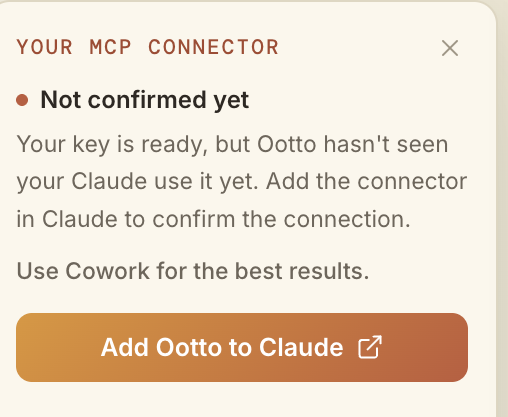
Add Ootto to Claude
Use the one-button Add flow so Ootto appears in Claude's Connectors panel.
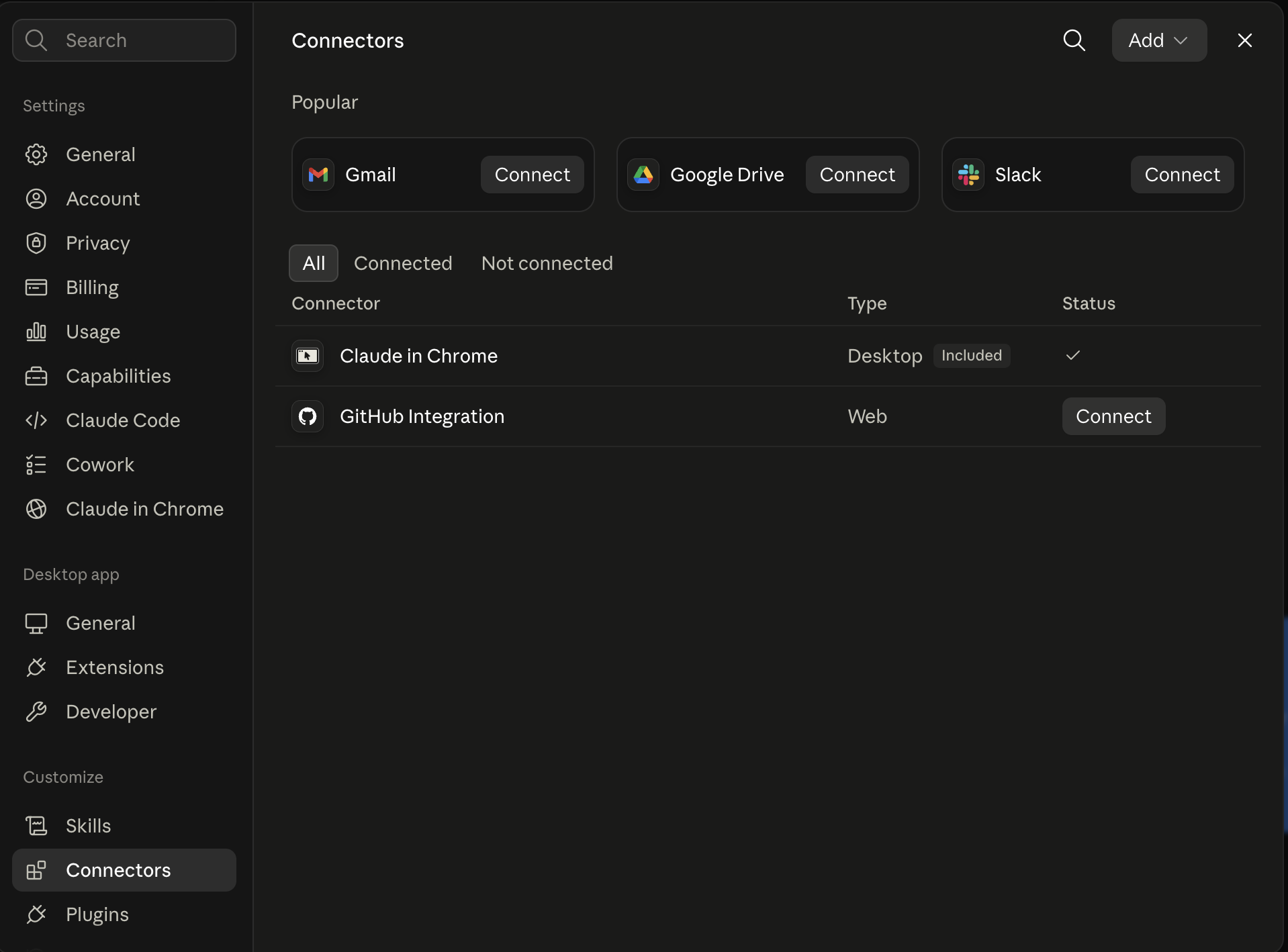
Claude shows the connector
The connector lands in Claude's Connectors settings, confirming Ootto is wired.
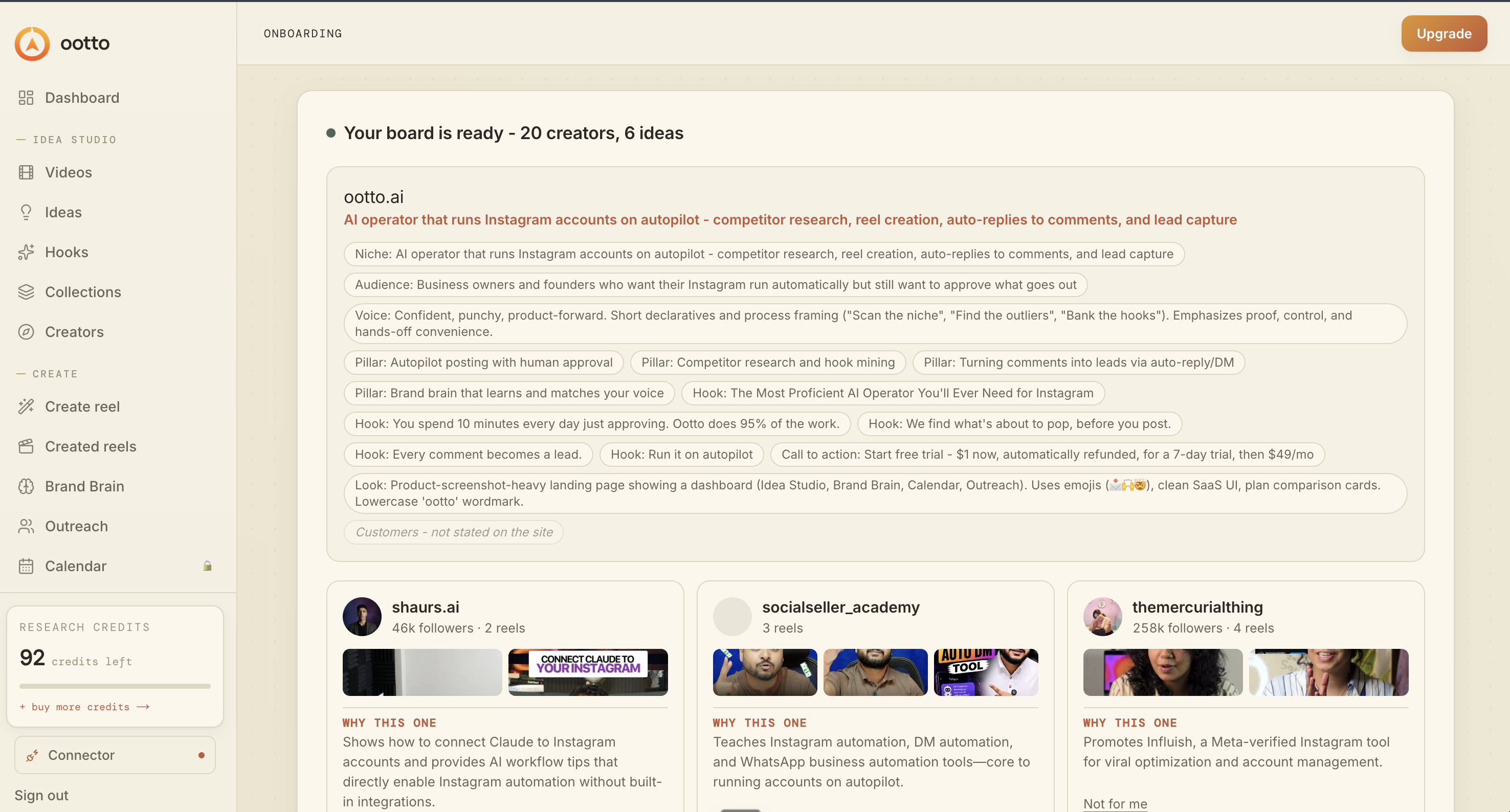
Board reads back your context
Your audience, pillars, voice, and creator signals are filled from account context.
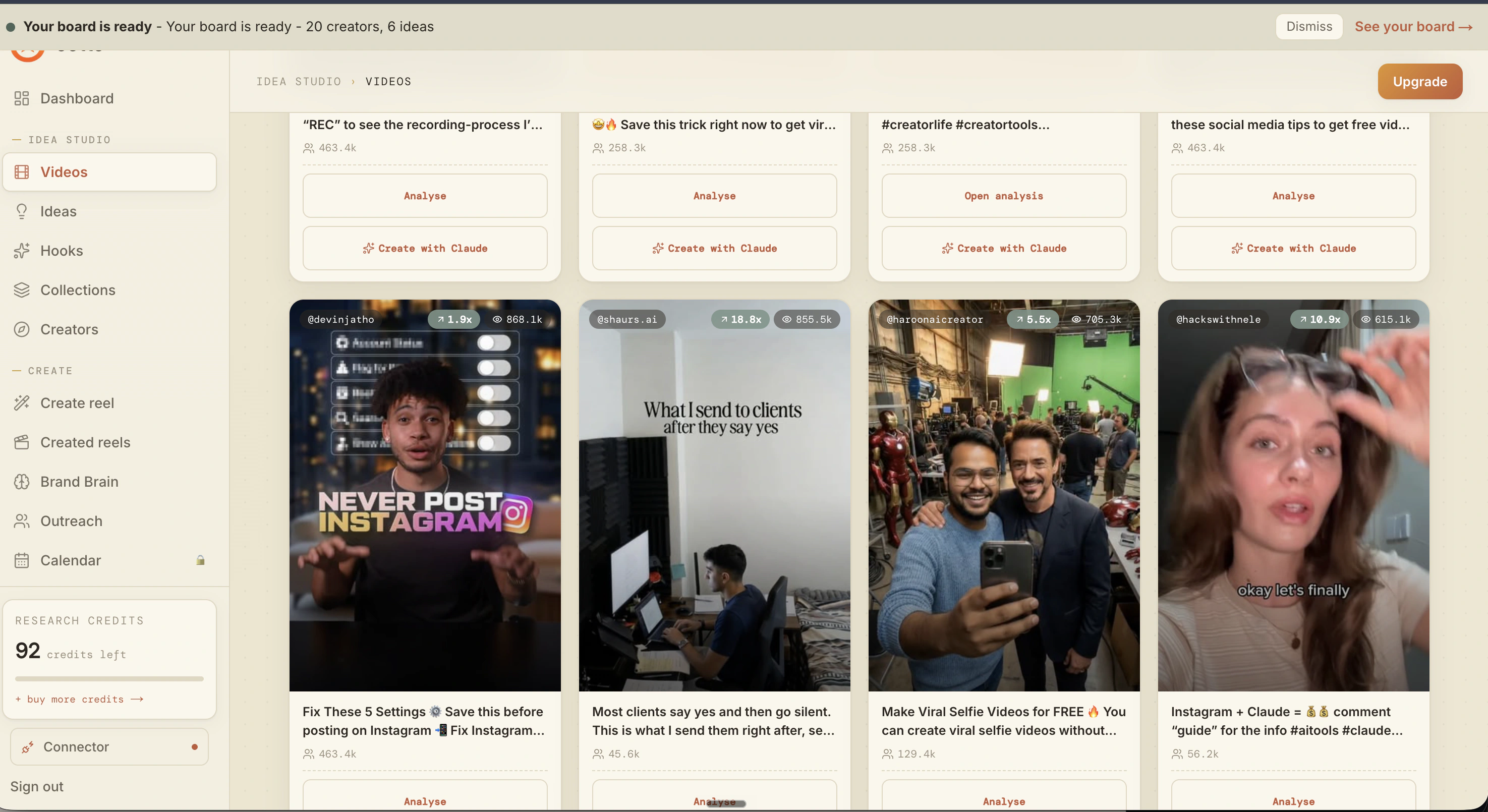
What is actually working now
Ootto pulls what is moving in your niche and loads ranked examples in board.
Reels post, comments get answered
Finished reels publish to Instagram and comments are answered with public replies plus DM follow-ups.
Ootto
Run Ootto in your Claude
Skip the manual setup
- Finds winning content opportunities
- Creates on-brand Reels and captions
- Replies to comments instantly
- Starts personalized DM conversations
- Qualifies leads automatically
- Helps book calls and drive sales
- Learns and improves with every interaction
One AI. Every Post. Every Comment. More Leads. More Sales.
Get started$48/month, charged today. Cancel any time.
Get started