
Invoicing
How to Automate Invoice Reminders With AI (and Actually Get Paid)
The Ootto Team · 3 min read · June 10, 2026
How to use this
1Connect Claude to Instagram
Connect Claude to your Instagram account
One click opens Claude with the connector already filled in - sign in, authorize, and it's live. No key to copy, no setup outside your browser.
https://mcp.ootto.ai/mcpConnect2Add the skills
Once Claude can reach your account, give it the methods to work with. Clone the free repository and Claude discovers the skills automatically.
git clone --depth 1 https://github.com/Ootto-AI/claude-content-skills.git && bash claude-content-skills/install.shBrowse all 30 skills on GitHubInstructions: how to connect your Instagram account to Claude
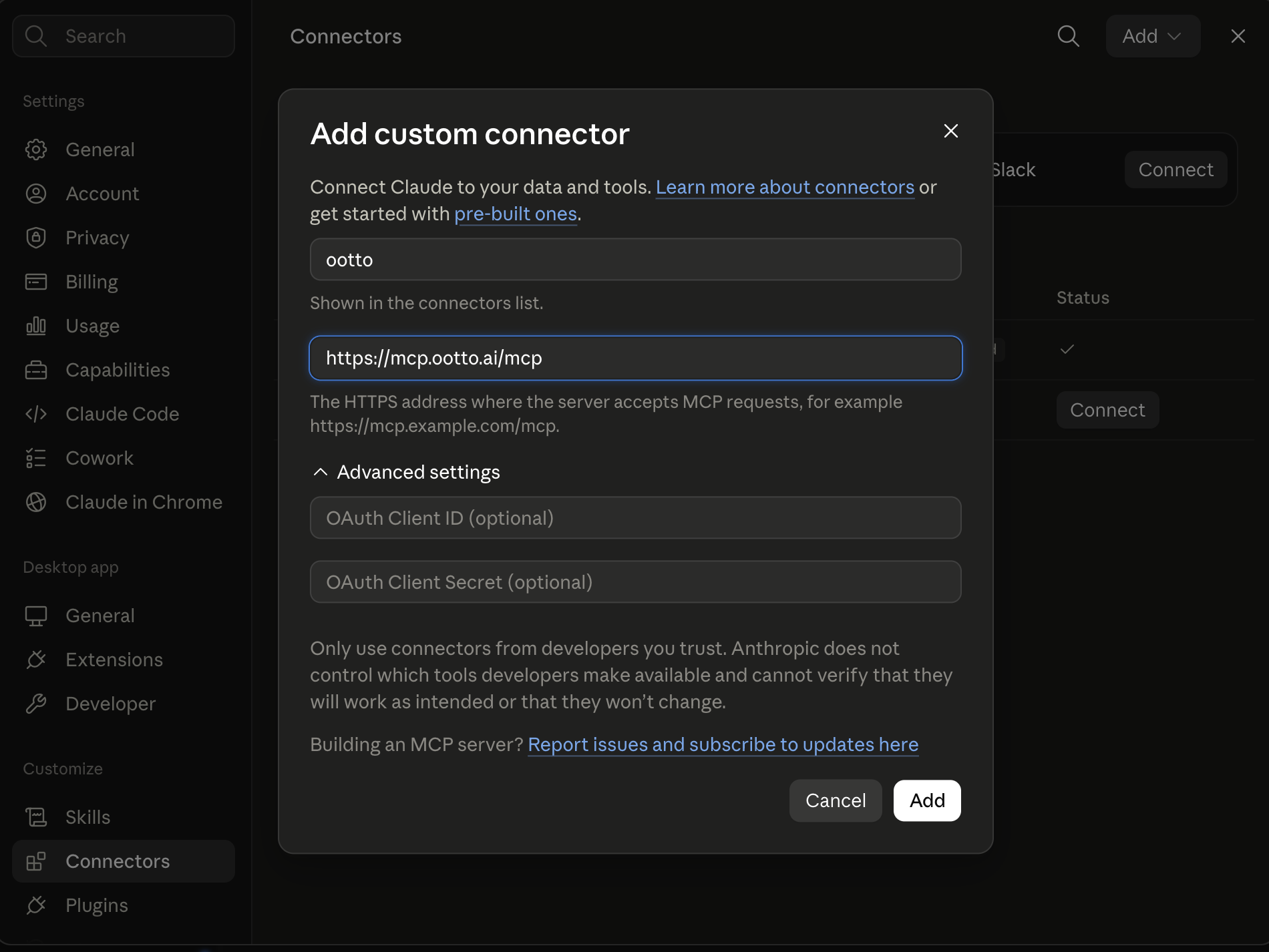
Connect above does this for you. If Claude ever opens the dialog empty, here's exactly what goes where:
Ootto
Your 24/7 Instagram Growth Operator
Skip the manual setup
- Posts finished Reels straight to your Instagram
- Real motion-graphic Reels, not slideshows
- Built around your own photos and footage
- Finds winning content opportunities in your niche
- Writes on-brand scripts and captions
- Answers every comment by your own keyword rules
- DMs qualified leads and starts the conversation
- Runs up to 50 Instagram accounts
One AI. Every Post. Every Comment. More Leads. More Sales.
Chasing unpaid invoices is the work nobody starts a business to do. It's awkward, it's easy to forget, and the longer you wait, the harder it gets to collect. The fix isn't working harder on follow-ups — it's removing yourself from them. Here's a simple cadence that works, and how to put it on autopilot with AI.
Why invoices go unpaid (it's usually not the money)
Most late payments aren't refusals — they're drift. The invoice lands in a busy inbox, gets mentally filed under "later," and nothing reminds the client until you do. The businesses that get paid fastest aren't more aggressive; they're more consistent. They follow up on a schedule, every time, without it depending on someone remembering.
That consistency is exactly what's hard to do by hand and easy to automate.
The reminder cadence that works
You don't need a complicated dunning system. A three-touch cadence, anchored to the due date, covers the vast majority of cases:
1. The polite nudge (0–7 days after due)
Friendly, assumes good faith. People miss dates; this is a gentle reminder, not an accusation.
Hi [Name] — just a quick note that invoice [#] for [amount] was due on [date]. If it's already on its way, thank you! If not, here's the link to pay: [link].
2. The firm reminder (8–21 days)
Direct, still professional. State the overdue amount and make paying effortless.
Hi [Name] — invoice [#] for [amount] is now [X] days overdue. Could you let me know when we can expect payment? You can pay here: [link].
3. The final notice (22+ days)
Clear about next steps, without burning the relationship.
Hi [Name] — invoice [#] remains unpaid [X] days past due. Please arrange payment by [date] to avoid [late fee / pause in work]. Pay now: [link].
Three templates, triggered at roughly +7, +14, and +21 days past due, will resolve most late invoices before they become real problems.
Where AI changes the game
A cadence is only useful if it actually runs. This is where doing it manually breaks down — and where AI earns its place:
- It triggers on time, every time. Reminders fire on the due-date schedule without you tracking who owes what.
- It writes in your voice. Instead of robotic templates, AI drafts each reminder to match how you talk to clients — warmer for long-standing customers, firmer for chronic late payers.
- It reads the replies. When a client responds, AI can classify it — "paid," "will pay on [date]," "disputing" — and route the ones that actually need you, while handling the routine acknowledgements itself.
- It stops when paid. Connected to your payment tool, it knows when an invoice clears and cancels the remaining reminders automatically — no awkward "please pay" after they already did.
The result is the consistency of a collections process without the cost or the discomfort of running one.
Build it, or make it gone entirely
You've got two broad options:
- Build it yourself with a workflow tool (Zapier, Make, n8n) — connect your invoicing app, write the templates, set the delays, and maintain it. Workable if you like building. See our Zapier alternatives guide for the options.
- Let an autopilot handle it. Ootto connects to your email and payment tools, learns your tone, and runs invoice follow-up as one of its built-in jobs — drafting reminders, reading replies, and stopping when an invoice is paid. Nothing to build.
If you already enjoy maintaining automations, option 1 is fine. If invoice-chasing is exactly the kind of work you want gone, option 2 removes you from it entirely.
The bottom line
Late payments are rarely a pricing or product problem — they're a follow-up problem. A consistent three-touch cadence fixes most of it, and AI makes that cadence run without your attention. Set it up once, and "chasing invoices" stops being a thing you do.
Route A: do it yourself
Start with the exact free skill for this outcome
MIT, no account, no email. Install first, then run the command for your account.
For chasing overdue invoices: Invoice Chaser
git clone --depth 1 https://github.com/Ootto-AI/claude-invoice-skills.git && bash claude-invoice-skills/install.sh
Installs the free MIT Invoice Skills bundle into ~/.claude/skills in one shot.
/invoice-chaser [invoice number, amount, due date, days overdue]
Drafts the right payment reminder, tone matched to how late the invoice is.
Route B: let Ootto run it
Ootto replicates this on autopilot
Ootto
Run Ootto in your Claude
Skip the manual setup
- Finds winning content opportunities
- Creates on-brand Reels and captions
- Replies to comments instantly
- Starts personalized DM conversations
- Qualifies leads automatically
- Helps book calls and drive sales
- Learns and improves with every interaction
One AI. Every Post. Every Comment. More Leads. More Sales.
Get started$48/month, charged today. Cancel any time.
Get started