Skills
30 Claude Skills for Social Media Marketing
The Ootto Team · 5 min read · August 22, 2026
How to use this
1Connect Claude to Instagram
Connect Claude to your Instagram account
One click opens Claude with the connector already filled in - sign in, authorize, and it's live. No key to copy, no setup outside your browser.
https://mcp.ootto.ai/mcpConnect2Add the skills
Once Claude can reach your account, give it the methods to work with. Clone the free repository and Claude discovers the skills automatically.
git clone --depth 1 https://github.com/Ootto-AI/claude-content-skills.git && bash claude-content-skills/install.shBrowse all 30 skills on GitHubInstructions: how to connect your Instagram account to Claude
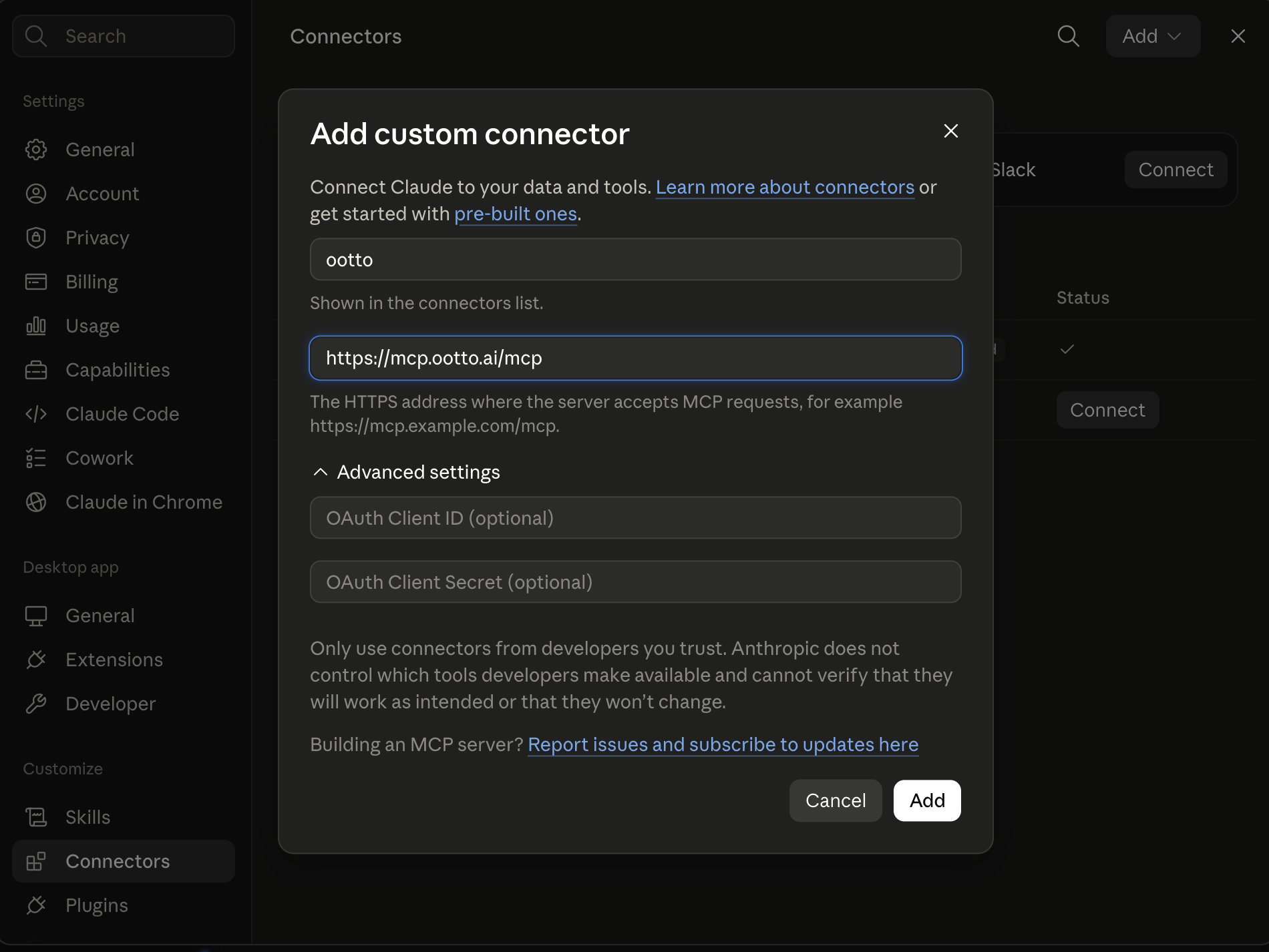
Connect above does this for you. If Claude ever opens the dialog empty, here's exactly what goes where:
Ootto
Your 24/7 Instagram Growth Operator
Skip the manual setup
- Posts finished Reels straight to your Instagram
- Real motion-graphic Reels, not slideshows
- Built around your own photos and footage
- Finds winning content opportunities in your niche
- Writes on-brand scripts and captions
- Answers every comment by your own keyword rules
- DMs qualified leads and starts the conversation
- Runs up to 50 Instagram accounts
One AI. Every Post. Every Comment. More Leads. More Sales.
Social media marketing is not one caption. It is deciding who a message is for, what proof it needs, where it belongs, how it will be measured, and what to do after it lands. These 30 installable Claude skills split that operator work into repeatable methods.
They are real Markdown skill files: 14 existing content-production skills plus 16 marketing skills in the Ootto skills repository. The groups follow the job, because an operator usually moves from market evidence to campaign decisions, then distribution and learning.
What is a Claude skill?
A skill is a Markdown instruction file that gives Claude a named, repeatable method. A prompt is a one-off request. A skill keeps the method available when the same job comes back next week.
What these social media skills are
The content skills make the work: research a reel, develop a hook, script, build, caption, plan, and handle a keyword-to-DM flow. The marketing skills decide the surrounding work: audience evidence, positioning, campaign brief, distribution, creator partnerships, attribution, and retrospectives. They do not purchase ads or publish without your approval.
Anatomy of a SKILL.md file
A skill has a name Claude can invoke, a short description of when to use it, the input it needs, and instructions for a useful output. The file is readable Markdown, so you can inspect and edit the method before running it.
---\nname: campaign-brief\ndescription: Create a social campaign brief from a real offer, audience, goal, and constraints.\n---\n\nCreate a brief with the objective, message, channel roles, proof, CTA, measurement, and approval checks.
That is the shape every Ootto skill follows: name, use case, then a method you can inspect.
Install the skills
First open Ootto-AI/claude-content-skills. The repository contains one folder per skill and an installer. In Claude Code, clone it and run the installer; restart Claude Code, then invoke a skill by name. In Claude, you can also paste the visible instruction into a conversation with the evidence it asks for.
git clone --depth 1 https://github.com/Ootto-AI/claude-content-skills.git && bash claude-content-skills/install.sh
The installer copies the skills into Claude Code's skills directory. Review a SKILL.md file first if you want to understand the method.
Connect Ootto when you need live Instagram work
Marketing methods work with pasted evidence. When the task needs a connected Instagram account—researching current reels, creating a reel, or handling an approved comment rule—connect Ootto in Claude. The connector is the data path; the skill is still the method.
How to use this
1Connect Claude to Instagram
Connect Claude to your Instagram account
One click opens Claude with the connector already filled in - sign in, authorize, and it's live. No key to copy, no setup outside your browser.
https://mcp.ootto.ai/mcpConnect2Add the skills
Once Claude can reach your account, give it the methods to work with. Clone the free repository and Claude discovers the skills automatically.
git clone --depth 1 https://github.com/Ootto-AI/claude-content-skills.git && bash claude-content-skills/install.shBrowse all 30 skills on GitHubInstructions: how to connect your Instagram account to Claude
Connect above does this for you. If Claude ever opens the dialog empty, here's exactly what goes where:
The 6 to run first
Audience Personas
Turns customer interviews, comments, reviews, or CRM notes into evidence-led audience segments, with language and objections quoted from the source.
Group this customer evidence into three audience segments. For each: job-to-be-done, language they use, objections, content angles, and the platform question they are already asking. Cite the source line for every claim.
Suggested cadence: At the start of a campaign Mode: Paste evidence
Positioning Audit
Finds the promise, proof, audience, and gaps in a profile and competitor material without claiming differentiation you cannot support.
Audit this brand and competitor material. State the current promise, proof, audience, category cues, and three positioning gaps. Recommend one precise position with evidence and a profile-message test. Flag every claim that needs proof.
Suggested cadence: Before changing your message Mode: Paste profile and competitor material
Campaign Brief
Converts a real offer and goal into an approval-ready brief: message, channel roles, creative territories, CTA, measurement, and risks.
Create a social campaign brief from this offer, audience, proof, budget constraint, and goal. Return objective, message, audience, channel roles, creative territories, CTA, measurement plan, risks, and what must be approved before publishing.
Suggested cadence: Before a launch Mode: Prompt
Cross-platform Distribution
Adapts approved source material for named platforms without duplicating copy or changing the underlying claim.
Adapt this approved source for Instagram, LinkedIn, and X. For each, state audience intent, native format, opening, proof, CTA, and what must change from the source. Keep claims unchanged.
Suggested cadence: When a campaign asset is approved Mode: Prompt
Creator Outreach
Writes personal outreach from real observed creator work, a real campaign brief, and one clear next step.
Write a short partnership outreach note using this creator evidence and campaign brief. Mention one specific piece of their work, explain the fit, state the proposed collaboration, and ask one clear next-step question. Do not fake familiarity.
Suggested cadence: For every shortlisted creator Mode: Paste evidence
Social Analytics Report
Turns an analytics export into observed changes, hypotheses, missing comparison data, and the next experiments.
Read this social analytics export. Report what changed, likely contributing patterns, segments worth examining, and three next experiments. Separate observed facts from hypotheses and state missing comparison data.
Suggested cadence: Weekly or after a campaign Mode: Paste export
All 30 skills
Market evidence and positioning
- Audience Personas
- Social Listening
- Positioning Audit
- Competitor Positioning
- Social Proof Mining
- Profile Conversion Audit
Campaigns, distribution, and partnerships
- Campaign Brief
- Cross-platform Distribution
- Paid Social Brief
- UTM Campaign Plan
- Influencer Partnerships
- Creator Outreach
- LinkedIn Thought Leadership
- X Thread Strategy
- Community Engagement Plan
- Launch Retrospective
Content production and conversion
- Content Research
- Reel Analyzer
- Going Viral
- Hook Mining
- Viral Hook Writer
- Reel Scripter
- Reel Builder
- Content Repurposer
- Caption & Hashtags
- Content Calendar
- Comment Responder
- Content Factory
Memory and measurement
- AI Brain
- Social Analytics Report
Skills vs prompts vs MCP connectors
| Skill | Prompt | MCP connector | |
|---|---|---|---|
| What it is | A reusable method | A one-off instruction | A connection to live tools or data |
| Best for | Repeatable marketing work | Trying one idea quickly | Working with current account data |
| Needs live data? | No, but it can use it | No | Yes |
Troubleshooting
Start with the evidence you have. A skill should say what it needs; if you do not have a current account connection, paste comments, profiles, interviews, approved claims, or an analytics export. Treat every recommendation as a draft for review, especially when it affects a public claim, creator relationship, campaign budget, or publication.
Frequently asked questions
Are these all Instagram skills?
Do skills publish anything?
Do I need a connector?
Where are the files?
Keep reading
content
14 Claude Skills That Turn It Into Your Social Media Team
Fourteen free, MIT-licensed Claude skills, handed over as the real command, not a summary. One instruction if you're in Claude Code, sign in and add a connector if you're on Claude AI or Cowork - plus today's connector walkthrough, shown in full.
content
Claude's skill for finding posts that actually spiked
Use content-research to pull the posts that spiked and decode what made them win.
content
The First Connector That Makes Your Instagram Reels With Claude
Connect Ootto to Claude in one click and Claude reads your Instagram, tears down the reels winning in your niche, and renders new ones in your brand. The full setup, the prompts we actually ran, and what each one returned.
content
How to Automate Your Instagram Content With AI (Reels on Autopilot)
Turn one idea into a week of Instagram reels with AI — hooks, scripts, captions and a posting calendar, all grounded in what already worked for you.
content
Claude's skill for keeping a two-week posting streak alive
Use content-calendar to turn your pillars into a 14-day posting rhythm with less panic and clearer direction.
Ootto
Run Ootto in your Claude
Skip the manual setup
- Finds winning content opportunities
- Creates on-brand Reels and captions
- Replies to comments instantly
- Starts personalized DM conversations
- Qualifies leads automatically
- Helps book calls and drive sales
- Learns and improves with every interaction
One AI. Every Post. Every Comment. More Leads. More Sales.
Get started$48/month, charged today. Cancel any time.
Get started