
Content
How Are These AI Motion Graphics Reels Made? (Claude, No Editor)
The Ootto Team · 7 min read · November 1, 2026
How to use this
1Connect Claude to Instagram
Connect Claude to your Instagram account
One click opens Claude with the connector already filled in - sign in, authorize, and it's live. No key to copy, no setup outside your browser.
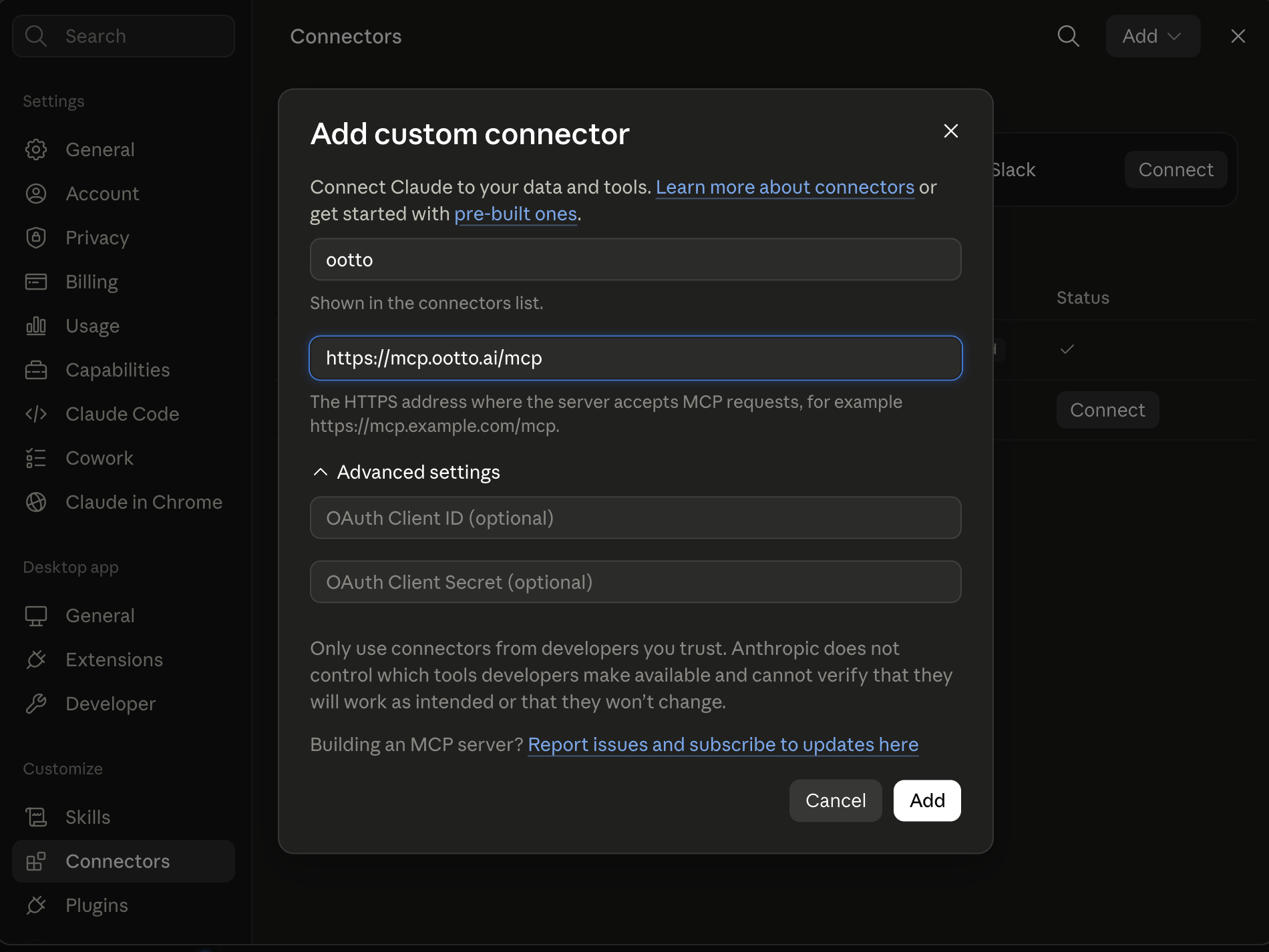
https://mcp.ootto.ai/mcpConnect2Add the skills
Once Claude can reach your account, give it the methods to work with. Clone the free repository and Claude discovers the skills automatically.
git clone --depth 1 https://github.com/Ootto-AI/claude-content-skills.git && bash claude-content-skills/install.shBrowse all 30 skills on GitHubInstructions: how to connect your Instagram account to Claude
Connect above does this for you. If Claude ever opens the dialog empty, here's exactly what goes where:
Ootto
Your 24/7 Instagram Growth Operator
Skip the manual setup
- Posts finished Reels straight to your Instagram
- Real motion-graphic Reels, not slideshows
- Built around your own photos and footage
- Finds winning content opportunities in your niche
- Writes on-brand scripts and captions
- Answers every comment by your own keyword rules
- DMs qualified leads and starts the conversation
- Runs up to 50 Instagram accounts
One AI. Every Post. Every Comment. More Leads. More Sales.
Claude writes the reel as code, then the code is rendered into a video. There is no editing app and no timeline.
Every scene is a small program that says what is on screen at each frame: the words, the shapes, the footage and when each one moves. Claude writes those scenes, times every word on screen to the voiceover, and a renderer turns them into a normal vertical mp4 you can post.
It is the question we get most under our own reels, in every version: "How do you create this motion graphics videos", "What are you using to make this video", "Is this video also made with Claude?". Here is the full answer, the way to do it yourself, and the shortcut.
How is a motion graphics reel made with Claude?
A normal editor works on a timeline: you drag clips and text boxes into place by hand. A code-made reel has no timeline. It has a script, and the script decides everything.
The steps, in order:
- The script. Claude writes what the voice says, line by line, with the hook first.
- The voice. A voiceover is generated from the script, and the exact start and end time of every spoken word is measured.
- The scenes. Claude writes each scene as code: a headline that slides in, a number that counts up, a screenshot that zooms, a clip of real footage.
- The timing. Every element is tied to the word it belongs to, so it appears when that word is said.
- The render. The code is played frame by frame and saved as a 1080 by 1920 mp4.
Because the reel is code, changing it is a sentence. "Make the second headline bigger" or "hold the last frame one second longer" is an edit Claude makes in the code, and the reel renders again.
Why does the text land exactly on each word?
Because the timing comes from the voice itself, not from someone guessing on a timeline.
When the voiceover is made, each word comes back with its own start and end time in seconds. Claude uses those times to trigger the text and the motion. That is why the caption pops on "free" exactly when you hear "free", every time, with no manual syncing.
It is also why these reels feel fast without feeling messy. Something changes on almost every beat, and every change lines up with the voice.
Do I need After Effects or CapCut?
No. Nothing in this process opens an editing app. The motion, the 3D phone mockups, the counters and the captions are all written as code and rendered.
You still need two things an editor would give you:
- Something to show. Your own footage, screenshots of your product, photos, or stock clips that match each line.
- Taste. Claude will make a reel that works, but you decide if the hook is strong and if the look is yours. Give it a reel you like as a reference and it will follow its pacing.
How do I make one myself?
You can do the whole thing yourself for free, if you are comfortable letting Claude run code on your computer.
- Use Claude Code. It can create files and run commands on your machine, which a chat window can't do. It comes with Claude's Pro, Max and Ultra plans (Claude Help Center).
- Ask it to set up a video project. Tell it you want to make Instagram Reels as code, at 1080 by 1920 and 30 frames per second, and let it pick and install a code-based video framework. The React-based one people on Reddit pair with Claude Code is free for individuals and for companies of up to three people; check the license of whichever one it picks.
- Give it your script and a reference. Paste your script and describe or link a reel whose pacing you like.
- Add a voice. Record yourself, or use a text-to-speech tool that returns word timings, and save the audio and timings in the project.
- Ask for the scenes. For example: "Build this as six scenes. Put each headline on the word it names. Keep all text inside the middle of the frame so Instagram's buttons don't cover it."
- Render and watch it. Ask Claude to render the mp4, watch it on your phone, and send your notes back in plain words.
This prompt is a good start once the project is set up:
Build this script as a 1080x1920 Instagram Reel at 30fps. One scene per line. Every headline appears on the word it names, using the word timings in the audio file. Keep text out of the top and bottom of the frame where Instagram's buttons sit. Then render it and tell me where the file is.
Paste your script under it. Works in Claude Code with a video project already set up.
What goes wrong the first time?
The same few things go wrong for almost everyone, including us:
- Text in the dead zone. Instagram puts the caption, the username and the buttons over the bottom and the right side of the video. Text placed there gets covered. Keep it in the middle.
- Too much on screen. A scene with three moving things reads as noise. One idea per beat.
- A slow first second. If nothing moves in the opening frames, people scroll. The hook has to be on screen from the very first frame.
- Generic looks. Ask Claude for a "motion graphics reel" and you get the same style everyone else gets. Give it your colours, your fonts and a reference you actually like.
- Not watching the render. Claude can't see the video the way you do. Watch every render before you post it.
How does Ootto make them for you?
Ootto is the same process with the setup already done, connected to your Instagram.
You connect Ootto to Claude once (the steps), and then you ask for a reel in plain words. Inside Ootto, Claude gets a private workspace with the video project ready, your brand, your own files and the reels you already posted. It writes the script and the scenes, makes the voice (a stock voice or your own cloned voice), times every word, renders the reel and puts it in your Ootto library.
Nothing is posted until you approve it. Ootto's own estimate is that your first reel takes about 20 to 25 minutes while Claude learns your brand, and later ones are faster.
It needs a paid Ootto plan; what is free and what isn't is on Is Ootto free?. If you would rather not touch Claude at all, the done-for-you plans have our team send you the reels every week to approve.
Frequently asked questions
Can Claude make videos?
What app makes the text pop up on every word?
Do I need to know how to code?
Can I use my own footage?
Does this work for YouTube Shorts too?
Keep reading
content
Which Claude Plan Do You Need to Make Instagram Reels?
Any Claude plan, Free included, can make Instagram reels through the Ootto connector. Making them yourself in Claude Code needs Pro or higher. Here is which plan does what, and where ChatGPT fits.
content
The Only Way to Grow Your Instagram With Claude in 2026
How we grew to over 10,000 leads in a month on Instagram with Claude, in 15 minutes a day - free to run yourself, or let Ootto run it for you.
content
How to Make Faceless Instagram Reels With Claude (In Your Own Cloned Voice)
No face, no camera, still your voice. How to clone your voice once in Ootto and have Claude make faceless Instagram reels with it, with the real reel and prompt.
content
ChatGPT vs Claude: The Video Edit Prompt
We gave ChatGPT's Codex and Claude the same voiceover, the same prompt and the same library, and let each edit a reel. Here is the exact prompt, and how to make reels like this.
Ootto
Run Ootto in your Claude
Skip the manual setup
- Finds winning content opportunities
- Creates on-brand Reels and captions
- Replies to comments instantly
- Starts personalized DM conversations
- Qualifies leads automatically
- Helps book calls and drive sales
- Learns and improves with every interaction
One AI. Every Post. Every Comment. More Leads. More Sales.
Get started$48/month, charged today. Cancel any time.
Get started