Content
Make Viral Instagram Carousels With Claude
The Ootto Team · 5 min read · September 9, 2026
How to use this
1Connect Claude to Instagram
Connect Claude to your Instagram account
One click opens Claude with the connector already filled in - sign in, authorize, and it's live. No key to copy, no setup outside your browser.
https://mcp.ootto.ai/mcpConnect2Add the skills
Once Claude can reach your account, give it the methods to work with. Clone the free repository and Claude discovers the skills automatically.
git clone --depth 1 https://github.com/Ootto-AI/claude-content-skills.git && bash claude-content-skills/install.shBrowse all 30 skills on GitHubInstructions: how to connect your Instagram account to Claude
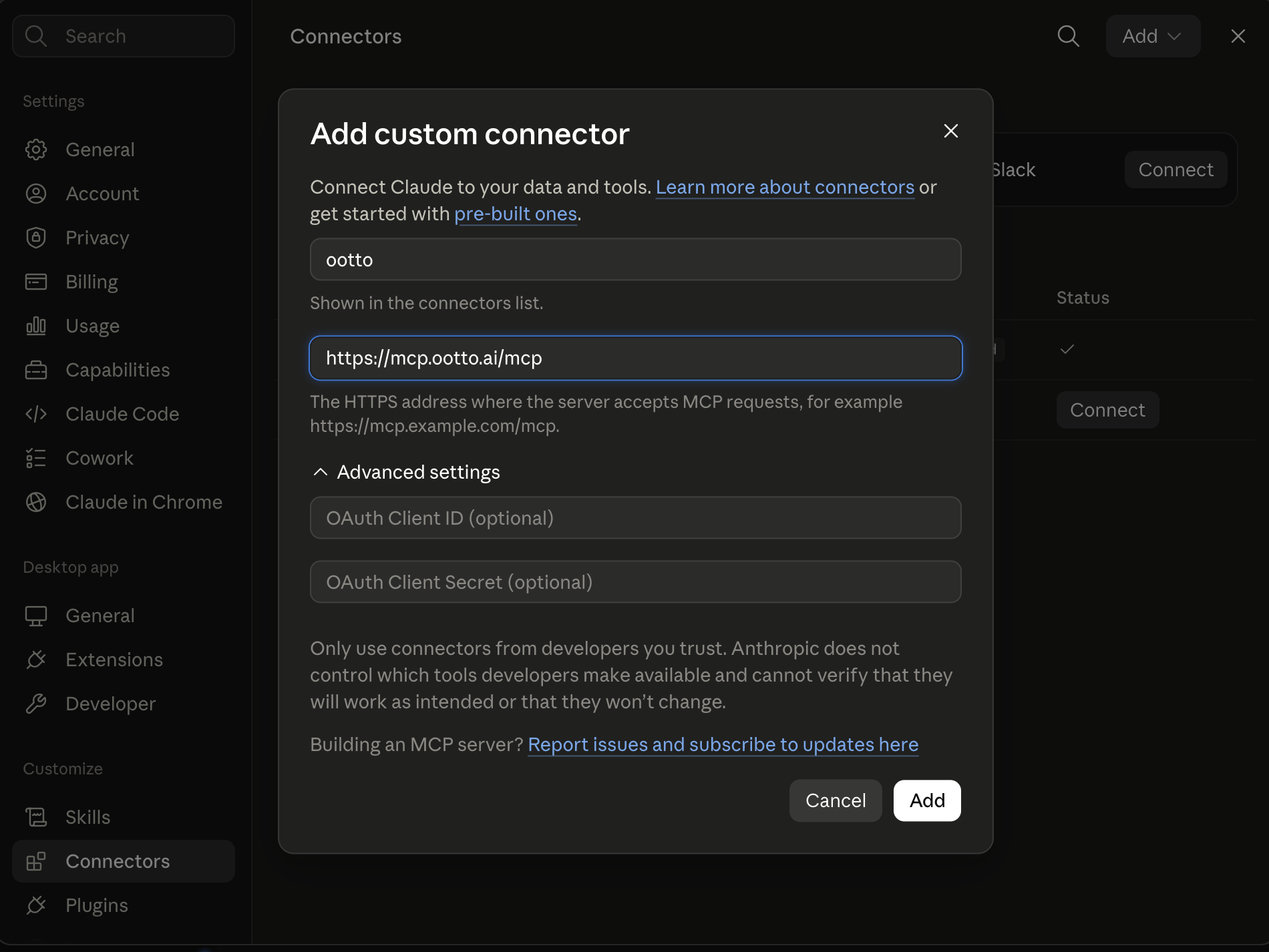
Connect above does this for you. If Claude ever opens the dialog empty, here's exactly what goes where:
One prompt, and Claude builds the whole carousel.
On Claude Pro or Max, switch to Opus before you build. It makes a visibly better carousel.
A reel is motion. A carousel is the format someone stops on, swipes through, and screenshots. Same connector, same brand, a different medium, and the whole thing still starts with one sentence. Here is exactly how it works.
Set it up in Claude
Start a new project
Open Claude and go to Projects. Create one called Carousel Maker so every prompt and result you build with it live in one place.
Add the Ootto connector
Add a custom connector named ootto pointed at https://mcp.ootto.ai/mcp. It is the same connector every reel customer already uses, and it works the same way for carousels.
One prompt, whole carousel
Ask Ootto to find a viral carousel for your niche and make it in your tone. It researches what is actually working first, then Claude writes the cover, every slide, and the caption.
Approve, then post
Nothing goes out on its own. Look over the slides Claude built, then post straight from the same conversation.
Find a viral carousel for my niche and make it in my tone.
Ootto studies real carousels already working in your niche before Claude writes a single slide, so what comes back is grounded in what is actually working, not a guess.
What comes back is a finished carousel, not a script for one. The cover is built to earn the first swipe. Every point slide carries one real idea, not a restatement of the one before it. The last slide asks for a single thing. Every slide renders in your own brand's colors, type, and either your real photos or licensed stock, never an invented image standing in for one. Approve it, then post it.
Want a whole month done in one sitting instead of one carousel at a time? Ask for that instead.
Find 30 carousels worth posting this month for my niche, build each one in my tone, and schedule them three a week.
Claude does this the same way, just more times: research a carousel, build it, then queue it for a set day instead of posting right away. You still see and approve every slide before it goes anywhere.
Ootto
Your 24/7 Instagram Growth Operator
Skip the manual setup
- Posts finished Reels straight to your Instagram
- Real motion-graphic Reels, not slideshows
- Built around your own photos and footage
- Finds winning content opportunities in your niche
- Writes on-brand scripts and captions
- Answers every comment by your own keyword rules
- DMs qualified leads and starts the conversation
- Runs up to 50 Instagram accounts
One AI. Every Post. Every Comment. More Leads. More Sales.
What it learns about you
This runs on the same Brand Brain that builds your reels. Ootto reads your website, your connected Instagram, and research on your niche to learn your tone, your content pillars, the hooks that already work for your audience, and hard rules for what you will never say. You can correct any of it by hand, and the correction sticks for every carousel and reel that follows. It is why a carousel built this way reads like your account, not like an AI wrote it.
See the same brand rules read back in one board in the connector walkthrough, niche, audience, voice, pillars, and hooks, before a single carousel or reel gets made.
Schedule them
A carousel does not have to post the moment it is built. Once you have approved it, tell Claude when to post it instead, and it goes out on its own at that time through the same queue the Ootto dashboard uses. You do not have to be there for it to fire, and you do not have to touch anything else.
Give it a time
Say when, for example 'schedule this for next Tuesday at 9am' or 'post this Thursday.' Claude works out the exact time and queues it.
See what is queued
Ask 'what's scheduled?' and Claude lists everything pending for the account, reels and carousels together, soonest first.
Move or swap one
Ask Claude to cancel a scheduled post, then give it a new time, or schedule a different carousel in its place. Nothing already posted is touched.
Instagram connected
Scheduling only works while your Instagram is connected and healthy right now. If it is not, Claude will tell you to reconnect before it can queue anything.
Running more than one account
Ootto is not locked to one Instagram. From Accounts in the sidebar, press Add account and onboard a second, third, or fiftieth client the same way you onboarded the first: one box for their website, Instagram handle, or niche, an optional Instagram connect, and Ootto builds them their own Brand Brain and their own research board, kept completely separate from every other client you run.
Switch which one the app is working on from the Active brand picker at the top of every page, or press Make active on any card back in Accounts. Either way, the dashboard, research, and every reel or carousel Ootto builds follow whichever brand is active.
One thing stays the same across every brand you add: your plan, your credit balance, and your connector key. Connect Ootto to Claude once and it reaches every account under your login, and you just say which client you mean. Everything else, the brand, the Instagram connection, the reels and carousels, is its own, per account.
Ootto shows this as N of 50 brands on the Accounts page, the real allowance on a paid plan. If you are already running more accounts than your plan includes, you keep every one you have. The limit only applies to adding another.
Frequently asked questions
Do carousels need the same connector as reels?
Does Ootto post the carousel without me approving it first?
Can Claude build a carousel without the connector?
Keep reading
content
The Only Way to Grow Your Instagram With Claude in 2026
How we grew to over 10,000 leads in a month on Instagram with Claude, in 15 minutes a day - free to run yourself, or let Ootto run it for you.
content
The First Connector That Makes Your Instagram Reels With Claude
Connect Ootto to Claude in one click and Claude reads your Instagram, tears down the reels winning in your niche, and renders new ones in your brand. The full setup, the prompts we actually ran, and what each one returned.
content
Claude's skill for finding posts that actually spiked
Use content-research to pull the posts that spiked and decode what made them win.
content
14 Claude Skills That Turn It Into Your Social Media Team
Fourteen free, MIT-licensed Claude skills, handed over as the real command, not a summary. One instruction if you're in Claude Code, sign in and add a connector if you're on Claude AI or Cowork - plus today's connector walkthrough, shown in full.
content
How to Automate Your Instagram Content With AI (Reels on Autopilot)
Turn one idea into a week of Instagram reels with AI — hooks, scripts, captions and a posting calendar, all grounded in what already worked for you.
Route A: do it yourself
Start with the exact free skill for this outcome
MIT, no account, no email. Install first, then run the command for your account.
For this outcome: Content Factory
git clone --depth 1 https://github.com/Ootto-AI/claude-content-skills.git && bash claude-content-skills/install.sh
Installs the free MIT Content Skills bundle into ~/.claude/skills in one shot.
/content-factory - my niche is [niche], model this reel: [reel URL], my handle @..., CTA keyword GUIDE
Runs the full pipeline order for the post: research, hook, script, build, caption, and comment-to-DM lead setup.
Route B: let Ootto run it
Ootto replicates this on autopilot
Ootto
Run Ootto in your Claude
Skip the manual setup
- Finds winning content opportunities
- Creates on-brand Reels and captions
- Replies to comments instantly
- Starts personalized DM conversations
- Qualifies leads automatically
- Helps book calls and drive sales
- Learns and improves with every interaction
One AI. Every Post. Every Comment. More Leads. More Sales.
Get started$48/month, charged today. Cancel any time.
Get started